
Adding a sensor
A new sensor needs no code and no configuration on the sensor itself. It announces itself; you decide what it watches.
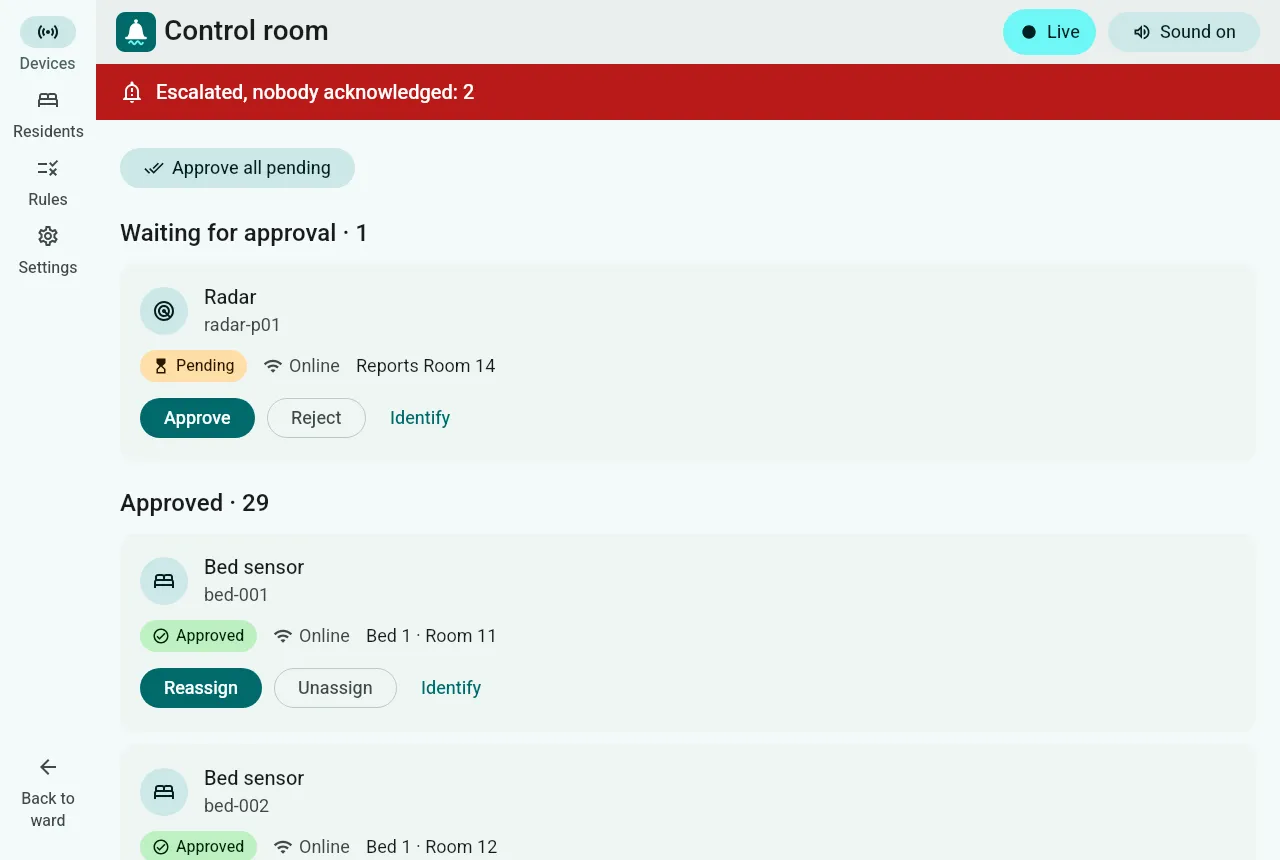
Approve a sensor
Section titled “Approve a sensor”-
Switch the sensor on in the room. Within seconds it appears under Waiting for approval, with its id, its type, the room it reports and whether it is online.
-
Not sure which device it is? Tap Identify: the sensor beeps or blinks.
-
Tap Approve and choose what it watches:
- A bed: radars, bed pads and call bells. Whoever lies in that bed is measured; when residents move, the sensor follows the bed.
- A resident: wearables such as the oximeter and thermometer. They follow the person.
- The whole room: the room microphone.
The usual choice for the sensor type is pre-selected; in a room with one bed, approving takes two taps.
Until it is approved, a sensor is ignored: a stray or faulty device can never raise an alert.
Approve everything at once
Section titled “Approve everything at once”Approve all pending approves each sensor to the obvious place and skips what it cannot decide safely, with the reason: for example a personal sensor in a room with two residents, because it will never guess whose vitals they are. Approve those by hand.
Later changes
Section titled “Later changes”- Reassign: the sensor watches something else, without going back to pending.
- Unassign: back to pending.
- Reject: the sensor is ignored from now on.
A sensor that stops reporting raises Sensor offline for the residents it watched after 15 seconds, never a false “not breathing”.